

Mobile app play
4 Hot Chillies runs in a mobile browser and can also appear inside casino apps. There is no separate 4 Hot Chillies app from the studio; an app you install is the casino’s.
Reels on a phone
The mobile game keeps its five reels, 25 fixed lines and four coloured feature stacks. Portrait play makes the reels narrower; landscape gives the two Double Reels boards more room. The Spin control, total-bet display and menu remain the controls to find first.
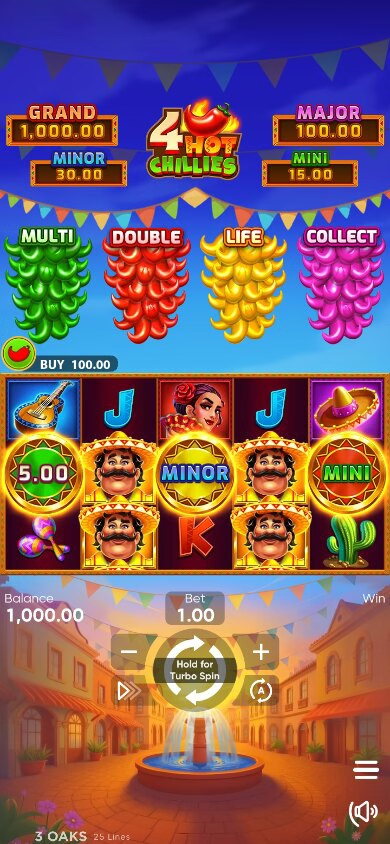
Portrait or landscape
| Orientation | What you get |
|---|---|
| Portrait | Five reels in a narrow column; easier one-handed play |
| Landscape | Wider view; both Double Reels boards and their counters sit side by side |
Rotate before you buy a Super Bonus. Double Reels is part of that entry, so it always shows two boards.
Touch controls
- Bet: opens the stake list, 0.10 to 65.00 credits in the demo.
- Spin: one tap per spin. Autoplay has its own button and turns into Stop.
- Menu: Rules, paytable and the Common Rules screen.
- Buy: opens the Bonus Shop with the 100× and 200× entries.
Browser or casino app
Open the game from the casino lobby in your mobile browser. For an app, search its catalogue for 4 Hot Chillies and follow the installation steps on the casino’s site.
Browser play is also an option on both platforms. For Android, the APK instructions cover a casino-supplied package. On iPhone, choose an App Store casino app or Safari access.
Mobile checklist
- Use a stable Wi-Fi or mobile connection; the game loads from the studio’s servers.
- Close heavy apps before a long session.
- Check the stake before every buy; a 200× price is easy to tap.
- Keep the phone charged for the length of a bonus.
Mobile demo controls
The demo has the Spin button, bet control, shop and Rules menu for trying the game on your device.